Clicks prove your keywords and ad copy work. Conversions prove that everything after the click works. When you get Google Ads clicks but no conversions, the gap between the two is where your budget disappears.
The cause is almost always one of five things, several of which cost nothing to fix. Work through them in the order below.
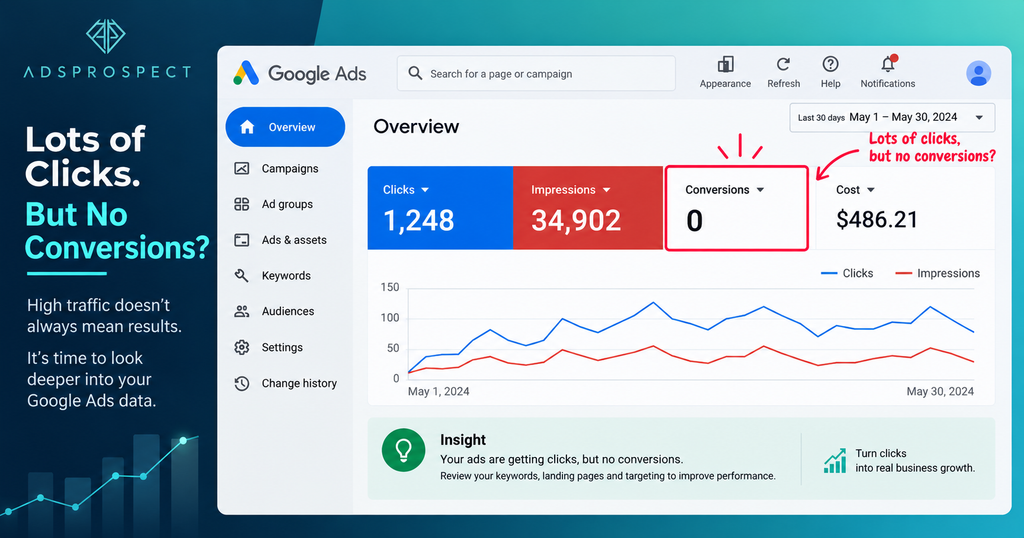
Confirm Your Tracking Works Before Anything Else
Rule out the cheapest explanation first: people are converting and Google Ads is not recording it. In your reports, broken measurement looks exactly like poor performance.
Common tracking failures:
- The tag or conversion event is missing from the thank-you page
- The conversion action is set as secondary, so it stays out of the Conversions column
- The trigger relies on a page load that never happens, as with inline form plugins
- Calls and WhatsApp enquiries are not tracked at all
Three quick checks:
- Submit a test enquiry and confirm it lands against the right conversion action
- Watch the tag fire live in Google Tag Assistant
- Read the status of every conversion action in your Google Ads account
Fix this before anything else. Every other decision depends on trustworthy data. [Internal Link: How to set up Google Ads conversion tracking correctly]
(H2) Five Reasons You Get Google Ads Clicks But No Conversions
1. Search intent does not match your offer
A click converts only if the searcher wanted what your page asks of them. “How to fix a leaking tap” attracts researchers; “emergency plumber near me” attracts buyers. Group keywords by intent, then move informational terms into a separate awareness campaign or drop them.
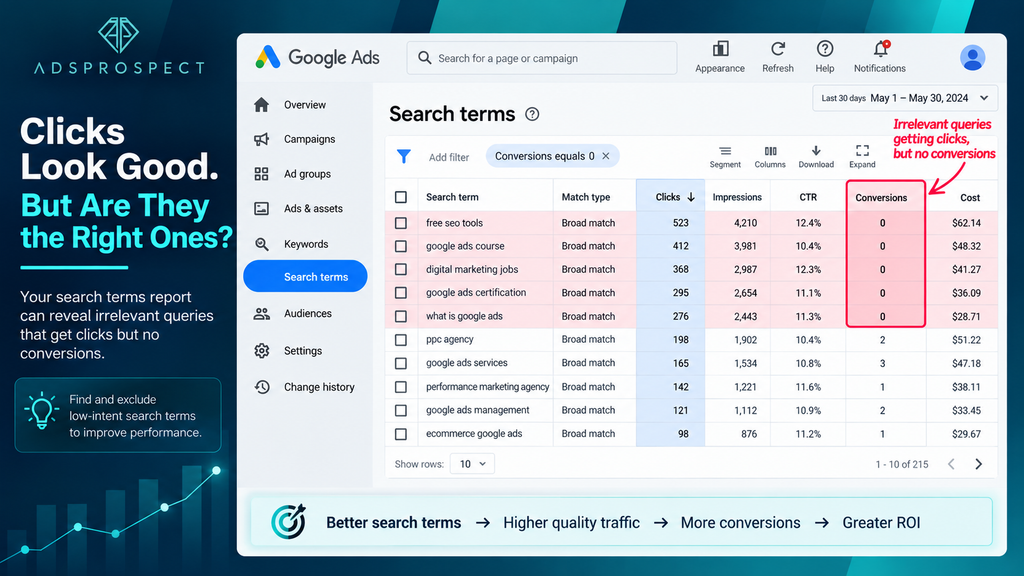
2. Broad keywords with a thin negative list
Broad and phrase match will find queries you never imagined, and without maintained negatives you pay for all of them.
- Filter the search terms report for clicks with zero conversions
- Add irrelevant queries as campaign or account-level negatives
- Block recurring patterns: free, jobs, DIY, salary, template
Promote strong queries into their own exact match ad group
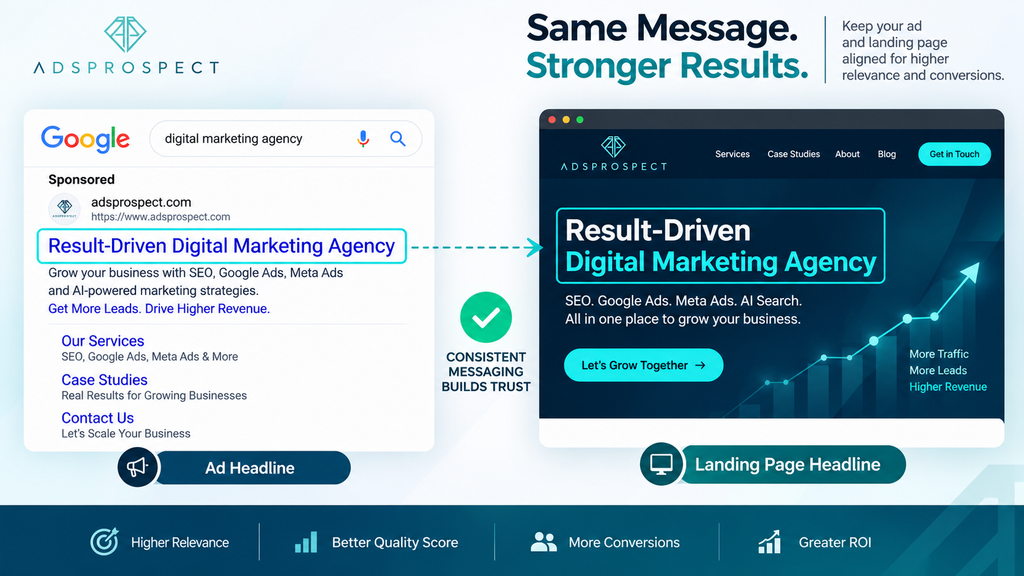
3. The landing page does not deliver what the ad promised
Message mismatch is the quietest conversion killer. If the ad promises a free site visit within 24 hours and the page opens with a company overview, most visitors leave rather than hunt for the offer.
- Ad headline and page headline share the same offer and wording
- The main call to action is visible without scrolling
- Forms ask only for what you need to make first contact
- The page loads fast and works properly on a real phone
Google’s Core Web Vitals guidance treats a Largest Contentful Paint of 2.5 seconds or less as good, which is a fair speed benchmark for paid traffic. [Internal Link: Landing page optimisation checklist]
4. The offer itself is not convincing
Sometimes the funnel works and the proposition does not. Visitors evaluate the page and leave because nothing gives them a reason to act.
- Reviews, testimonials, or documented results
- A guarantee, return policy, or free consultation
- Payment and security trust indicators at checkout
- Transparent total cost, including shipping and fees
5. Bidding and targeting optimise for the wrong outcome
Maximize clicks buys the cheapest available traffic, which is rarely the most motivated. Once tracking is verified, move to conversion-based bidding.
- Start with Maximize conversions to build data
- Add a Target CPA once volume is steady; Google suggests roughly 30 conversions in 30 days first. It is shown as a standalone strategy again as of June 2026
- Set location targeting to presence, not presence or interest, if you serve a fixed radius
Work Through the Fixes in This Order
- Verify conversion tracking from click to confirmation page.
- Clean the search terms report and add negatives.
- Align ad copy with the top of the landing page.
- Remove friction from the form or checkout.
- Strengthen trust signals and the offer.
- Switch to conversion-based bidding and let it settle.
Change one layer at a time, or you will never know which move worked.
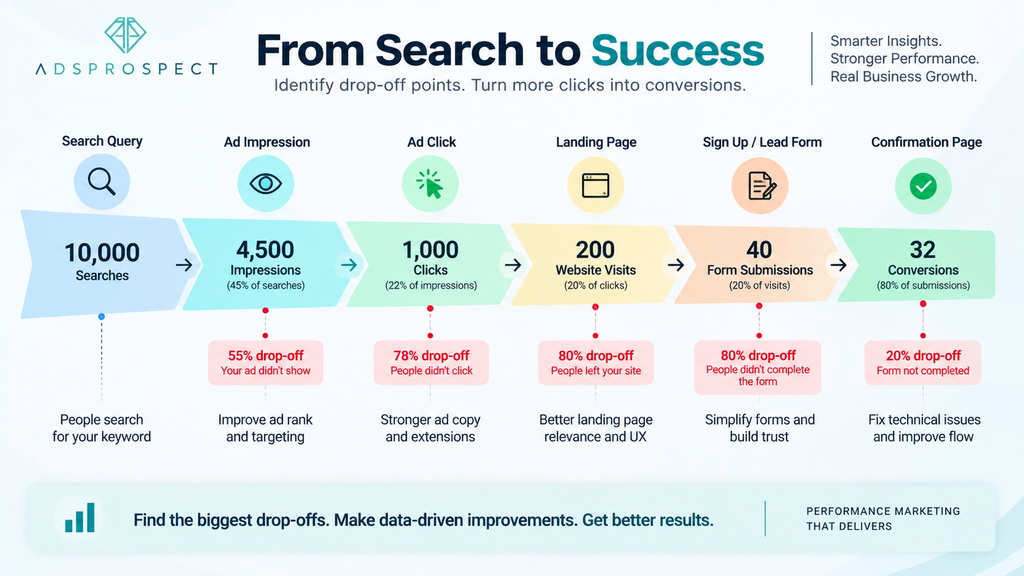
Turning Clicks Into Conversions
In most accounts, Google Ads clicks but no conversions is a measurement or alignment problem rather than a bidding one. Confirm you can trust the data, then follow the visitor path from query to confirmation page and repair the first point where it breaks.
Frequently Asked Questions
How many clicks before zero conversions is a real problem?
There is no universal number. Use your own conversion rate as a guide: if a page normally converts around three percent, twenty clicks is noise and three hundred is a signal.
Could invalid or fraudulent clicks explain it?
Google filters invalid clicks and credits advertisers for those it detects, so this is rarely the full story. Check tracking, intent, and the landing page first.
Should I pause a campaign that is not converting?
Pause the specific keywords or ad groups responsible instead. Switching off the whole campaign removes the data you need and resets learning when you restart.
Does zero conversions mean my keywords are wrong?
Not necessarily. If the search terms report shows relevant, high-intent queries, the issue is more likely tracking or the landing page. Keywords are the culprit when the report is full of searches you would never pay for.